
Define what day-one success means
Readiness cannot be judged without a target. Write down the business processes that must work immediately after go-live: account ownership, lead routing, pipeline reporting, support history, segmentation, renewals, or another critical workflow.
Then identify the fields and relationships those processes depend on. A blank optional industry subtype may be acceptable. A missing account owner, invalid lifecycle stage, or broken company-contact relationship may not be. This is why fitness for use is a better migration standard than perfection.
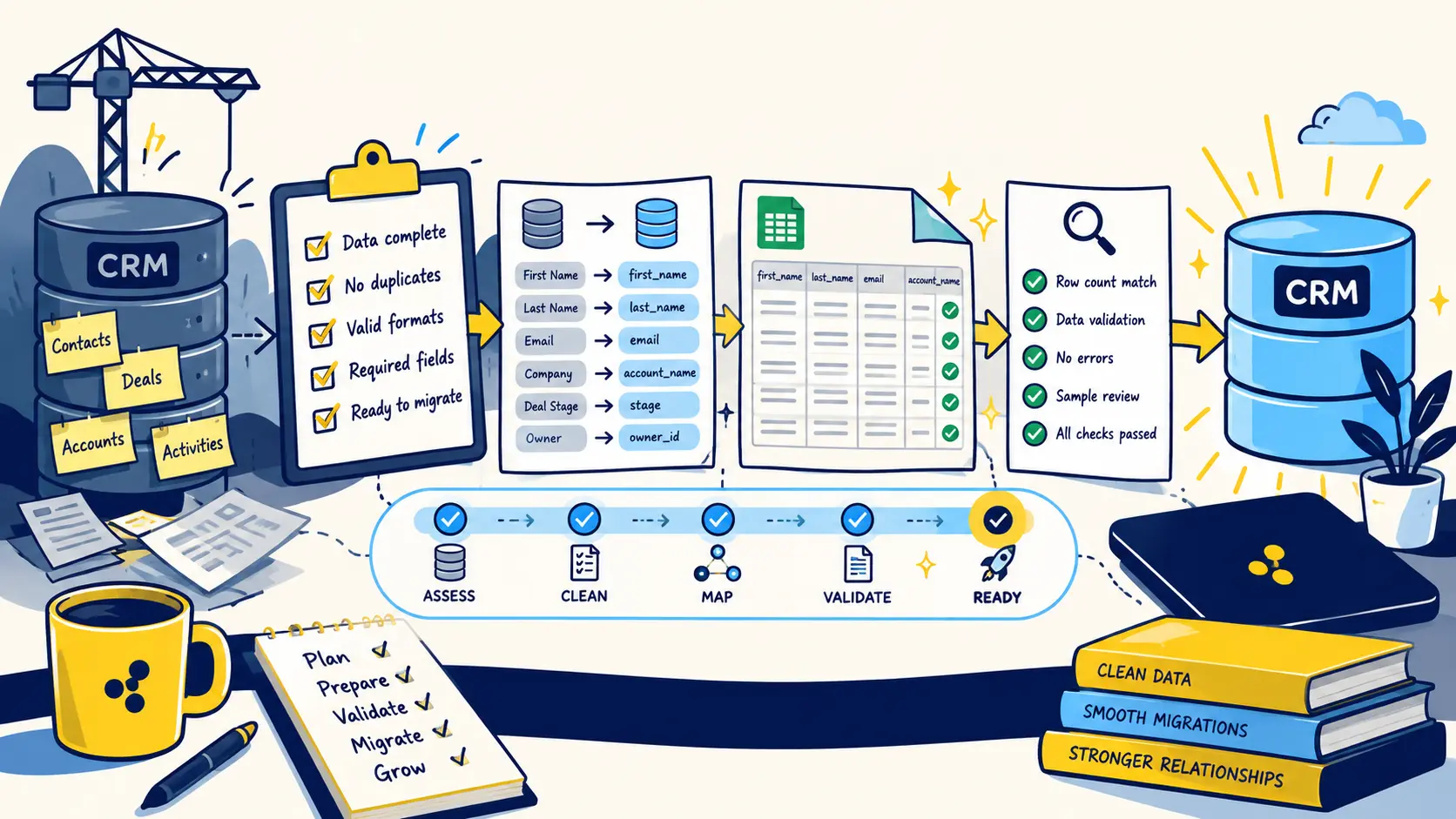
Gate 1: the source data is understood
You should know how many records exist, where they came from, how old they are, which systems are authoritative, and which fields have competing definitions. If nobody can explain what a field means or where its values came from, mapping it into the new system creates risk rather than continuity.
A source audit should also identify sensitive fields, retention requirements, obsolete records, and hidden spreadsheets that have effectively become shadow CRMs.
- Source systems inventoried
- Record counts documented
- Critical-field owners identified
- Authoritative sources agreed
- Archive and exclusion rules documented
Gate 2: critical data quality is acceptable
Measure readiness at the field and object level. Required fields should be sufficiently complete, duplicates should be controlled, categorical values should be standardized, and the records that drive revenue or customer operations should be current enough to use.
Do not hide uncertainty by filling cells with guesses. An explicit unknown value is safer than a confident-looking incorrect value because the target CRM can route, segment, and automate based on whatever you load.
Gate 3: every important field has a target rule
A readiness review should be able to answer what happens to every important source field. Does it map directly? Transform? Split? Merge with another field? Convert to a new allowed value? Move to notes? Get archived? The absence of a decision is itself a migration risk.
Mappings should be tested with real values, especially for status fields, picklists, currencies, owner assignments, and fields used by automation.
Gate 4: relationships can be rebuilt
Count how many contacts can be linked to the correct company, deals to the correct account, and child objects to the right parent. Stable IDs should be available for every relationship that matters.
If a meaningful percentage of records cannot be linked confidently, the migration is not ready simply because each table is clean in isolation. Relational integrity is part of data quality.
Gate 5: a representative pilot passes
The strongest readiness test is a migrated sample that real users can inspect. Include ordinary records and edge cases. Test the resulting views, reports, workflows, routing, ownership, and associations in the target environment.
Ask users whether they can perform the day-one processes defined at the start. If they cannot, turn the failure into a targeted remediation list. This keeps the project focused on what prevents use rather than endlessly polishing low-value fields.
Gate 6: cutover and rollback are defined
Before declaring the data ready, document the production sequence. Know when the source freezes, how final changes are captured, who can approve go-live, what checks happen immediately after import, and which failures would trigger rollback or delay.
Readiness means the team can explain how the move will be controlled from the final source export through post-import reconciliation.
Use a red, yellow, green readiness decision
A simple status model makes the decision visible. Green means a workstream is proven and ready. Yellow means the risk is understood and has an owner or accepted workaround. Red means the issue can break a critical workflow, corrupt relationships, or prevent reconciliation.
Do not average red risks away with dozens of green checklist items. One unresolved issue involving identifiers, critical relationships, ownership, or compliance can be more important than twenty minor formatting wins.
- Green: tested and acceptable
- Yellow: understood risk with owner and mitigation
- Red: blocks a critical workflow or reliable reconciliation
Common questions
Does CRM data need to be perfect before migration?
No. It needs to be fit for the workflows that must work after go-live. Critical fields, relationships, identifiers, mappings, and required data should meet an agreed quality threshold, while lower-value imperfections can be handled after launch if the risk is understood.
What is the best way to test CRM migration readiness?
Run a representative pilot migration and validate the result with real users. Check counts, field values, relationships, ownership, reports, and workflows rather than relying only on whether the import completed successfully.
What should block a CRM migration?
Examples include missing stable identifiers, unresolved duplicate logic, broken critical relationships, undefined field mappings, serious compliance concerns, or a pilot that cannot support required day-one processes.
Who should approve migration readiness?
Technical owners should confirm the mechanics, but business stakeholders who rely on the data should also validate that the migrated records support the workflows and reporting they need.
Final thoughts
Teams often ask whether their CRM data is clean enough to migrate. The useful answer is not 'perfect.' Data is ready when it can support the workflows that must work on day one, the critical fields are trustworthy enough for those workflows, relationships can be reconstructed, and a representative test migration behaves as expected. Readiness is a set of gates, not a feeling.
Need help improving your business data?
DataDabble can research, clean, enrich, and maintain the records your team depends on.


